
Create professional quotes and send them to your clients as PDFs
Enter the client and the work, and download a clear PDF with your details, VAT, validity and total, ready to send by email or WhatsApp. Free and without signing up.
🔒 Your quotes are stored only in your browser, not in the cloud. · Quotes only: it does not issue invoices.
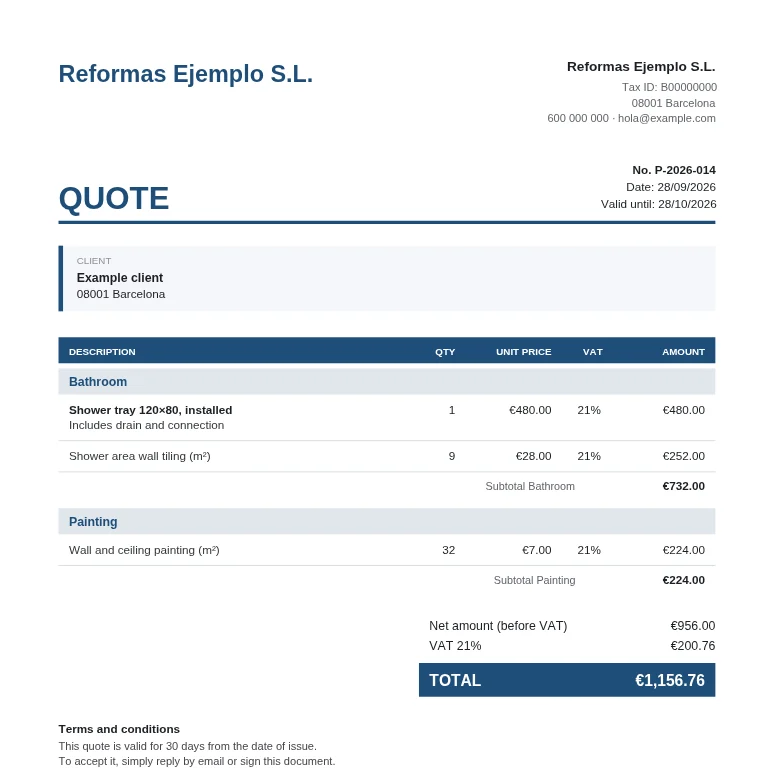
Everything a professional quote needs
Your brand
Logo, colour and nine PDF designs: classic, elegant, modern, minimal, contrast, grid, sidebar, summary and letter. An exact preview of the PDF as you type.
Clear taxes
VAT (IVA) per line with a breakdown, discounts, IRPF withholding and a total to the cent. Plus a price-before-VAT calculator.
Genuinely fast
Save your usual clients and services: type the service number, press Enter and it’s added with its description.
Organised
Blocks with subtotals (by floor, phase or area), statuses (sent, accepted, rejected), search and duplicate.
Private
No accounts or servers: your data never leaves your browser. Back it up to a file whenever you like.
Free
No limit on quotes and no watermarks. The site is funded by advertising.
How it works
- Enter the client
Their name and, if you like, their details. You add your business details once and they appear on every quote. - Add the work
Type the items, or use an example structure or your saved services. Totals are calculated automatically. - Download the PDF
Send it by email or WhatsApp. Then mark it as accepted or rejected.
Templates by trade
Start with a ready-made structure of items, with units and example quantities, and enter your prices. Everything is editable.
What it does and doesn’t do
✓ It does
- PDF quotes with your details, logo and template
- VAT (IVA), discounts and IRPF withholding
- A list of clients and usual services
- A backup file so you can recover everything
- English, Spanish and Russian (the PDF too)
✕ It doesn’t
- Invoices: to invoice you need invoicing software
- Store your data in the cloud or on our servers
- User accounts or syncing between devices
- Send the quote for you: you download it and send it yourself
🔒 Where your data is stored
Everything you type is stored only in the browser you use, on your computer or phone. It isn’t sent to any server and there’s no cloud copy. If you clear your browser data or switch devices, you’ll lose it unless you have a backup: the tool lets you download and restore one whenever you like.
Guides (in Spanish)
We also publish practical guides on making quotes in Spain, currently only in Spanish: what to include, VAT (IVA) and IRPF, validity and trade-specific examples.
Frequently asked questions
Is it really free?
Yes. You can create as many quotes as you like, download them as PDFs and save them, without paying anything. The site is funded by advertising.
Do I need to sign up?
No. Open the tool and start. We don’t ask for an email or password.
Where are my quotes stored?
In your own browser, on your computer or phone. They aren’t sent to any server or stored in the cloud, so nobody else can see them. That’s why we recommend downloading a backup from time to time: if you clear your browser data or change device, the backup lets you recover everything.
Can I add my logo and details?
Yes. You add them once and they appear automatically on all your quotes, with your colour and your choice of nine PDF designs.
Does it calculate VAT and IRPF?
Yes: VAT (IVA) per line (with a breakdown if there are several rates), per-line discounts, IRPF withholding and the total. It also has a calculator to get the price before VAT from a fixed total. You decide which rate applies in each case; if you’re unsure, check with your tax adviser.
Can I make invoices?
No. Presupueston is for quotes only. Invoices have specific tax requirements and must be issued with invoicing software.
Which languages is it in?
English, Spanish and Russian. The language changes the text in the tool and in the PDF; the currency (euro), VAT, IRPF and calculations don’t change, and neither does anything you type.
Does it work on my phone?
Yes, it works on phones, tablets and computers, in the browser and without installing anything.